
AI-Powered Google Chat Widget
Overview
The AI-Powered Google Chat Widget is a desktop-integrated browser extension designed to enhance search and communication experiences directly within Google. It enables users to interact with AI models, including those from ChatGPT and OpenAI, while simultaneously engaging with community-driven insights from Wikipedia and other sources. The tool aims to streamline research, content analysis, and real-time collaboration by combining AI-driven responses with crowd-sourced knowledge in a single interface.
Targeted primarily at professionals, students, and content creators, this tool supports efficient information retrieval and interactive learning. Its integration with Google allows seamless access to AI capabilities without leaving the browser environment. The developer, Ask AI, has positioned the tool as a featured search solution over five years, emphasizing continuous improvement in AI and real-time chat functionality.
Real-world use cases include quickly summarizing articles, verifying facts through community input, and asking follow-up questions while reading online content. The ability to right-click on any text and instantly “Ask AI” makes it particularly useful during research, writing, or learning sessions. The developer did not provide additional system requirements.
Key Features & Capabilities
- AI-Powered Search Integration – Access advanced AI models directly from Google, enabling users to ask complex questions and receive contextual, real-time responses based on up-to-date information.
- Community-Based Knowledge Access – Users can engage with community-driven insights, drawing from sources like Wikipedia, to supplement AI-generated answers with verified, crowd-sourced content.
- Right-Click Instant Query – A convenient feature that allows users to select any text on a webpage and instantly send it to the AI for analysis, explanation, or summarization.
- Unified Chat Interface – Combines AI chat and community discussion into a single widget, reducing the need to switch between multiple tools or tabs during research.
- Real-Time Interaction – Supports live conversations with AI and community contributors, enhancing collaborative problem-solving and dynamic content exploration.
These features are particularly beneficial in academic, technical, and creative workflows where accuracy, speed, and context are critical. For example, a researcher can highlight a paragraph in a journal article, right-click, and ask the AI to explain the methodology. Similarly, a student can verify a historical fact by comparing AI responses with community-reviewed entries.
User Interface, Workflow & Performance
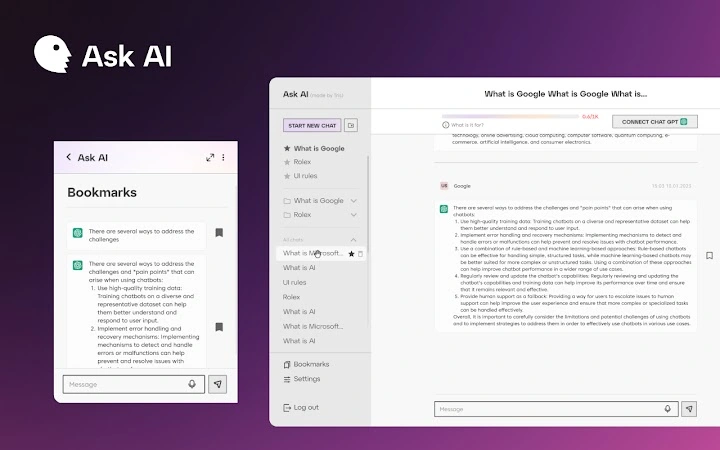
The interface is designed as a compact, unobtrusive widget embedded within the browser environment. It features a clean layout with minimal visual clutter, prioritizing functionality over aesthetics. Navigation is intuitive, with access to AI and community chat modes through clearly labeled tabs or toggles.
Workflow efficiency is enhanced by the right-click activation method, which minimizes context switching. Users can initiate queries without navigating away from their current page or tab. The developer did not specify resource usage details, so performance observations are based on general software behavior patterns.
Stability appears to be maintained through consistent updates and long-term development. The tool operates within the browser’s sandboxed environment, which contributes to overall system safety. The developer did not provide information on CPU or RAM consumption.
Compatibility & System Requirements
The software is compatible with Windows, Mac, and Linux operating systems, making it accessible across major desktop platforms. It is designed to integrate with standard web browsers used on these systems. The installation size is reported as 2.5 MB, indicating a lightweight footprint.
Exact system requirements were not listed. Compatibility information was partially provided. The tool does not require elevated permissions or extensive system resources, which suggests broad compatibility with modern desktop environments. The developer did not specify whether additional browser extensions or plugins are needed for full functionality.
Pros and Cons
Pros
- Seamless integration with Google and web browsers
- Combines AI and community insights in one interface
- Lightweight at 2.5 MB with no significant resource demands
- Right-click activation enables fast, context-aware queries
- Free to use with no licensing barriers
Cons
- Exact performance metrics and system requirements not disclosed
- Limited information on data privacy and security practices
- Dependent on external AI services, which may affect response consistency
- No indication of offline functionality
- Compatibility with older browser versions not confirmed
FAQ Section
Is the AI Chat Widget compatible with all browsers?
The software is compatible with Windows, Mac, and Linux, but specific browser compatibility details were not provided. Users should ensure their browser supports extensions or widgets of this type.
Is the tool safe to use with personal data?
The developer did not disclose detailed information about data handling, privacy policies, or encryption practices. Users should exercise caution when entering sensitive or confidential information.
How often is the software updated?
As a featured search tool over five years, the developer has maintained regular enhancements. However, the update frequency and release schedule were not specified.
What type of license does the software use?
The software is offered as free to use. No license details were provided beyond its free availability.
Can I use the tool offline?
There is no indication that the tool supports offline functionality. All features appear to rely on real-time connections to external AI and community services.
Final Thoughts
The AI-Powered Google Chat Widget delivers a streamlined, intelligent approach to online research and collaboration. By merging AI-driven responses with community knowledge, it offers a powerful solution for users who value speed, accuracy, and context. Its lightweight design and free access make it accessible to a broad audience.
While some technical and privacy details remain unspecified, the tool’s core functionality is clear and well-executed. It is especially beneficial for students, researchers, and professionals who rely on fast, reliable information retrieval. For those seeking an enhanced Google experience with built-in AI and community interaction, this tool stands out as a compelling choice.
Download AI-Powered Google Chat Widget now







